
Odoo is a very powerful tool for accounting management, but its flexibility can also lead to mistakes if not configured or used correctly. Below, we review the most common mistakes in Odoo accounting and explain to you how to avoid them, especially in the day-to-day operations of a company.

Not properly configuring the chart of accounts
❌ Error
Using the default chart of accounts without adapting it to the actual activity of the company (services, trade, industry, etc.).
✅ How to avoid it
- Review the accounts in groups 6 and 7and adapt them to actual expenses and income.
- Create sub-accounts when necessary (for example, separate 629 Transportation, 628 Supplies, 621 Leases).
- Make sure the accounts comply with the Spanish PGC.
Confusing expenses with purchases (accounts 600 vs 62X)
❌ Error
Recording services (transportation, repairs, fuel, electricity, phone) as purchases of goods (600).
✅ How to avoid it
Use these basic rules:
- 600→ Goods for sale
- 602→ Other supplies
- 621–629→ External services
Examples:
- Mail / SEUR / DHL →629
- Electricity / water / gas →628
- Fuel →628
- Vehicle repairs →622

3
Do not check VAT on intra-community and foreign invoices
❌ Error
Register a foreign invoice as if it had Spanish VAT or not apply the reverse charge.
✅ How to avoid it
Always check:
- Supplier's country
- If the supplier has intra-community VAT
- If the invoice has 0% VAT
Common cases:
- EU with 0% VAT→ reverse charge
- Outside the EU→ there may be import or foreign service
In Odoo, check carefully:
- Applied taxes
- Boxes of model 303 and 349
4
Not distinguishing corrective invoices from normal invoices
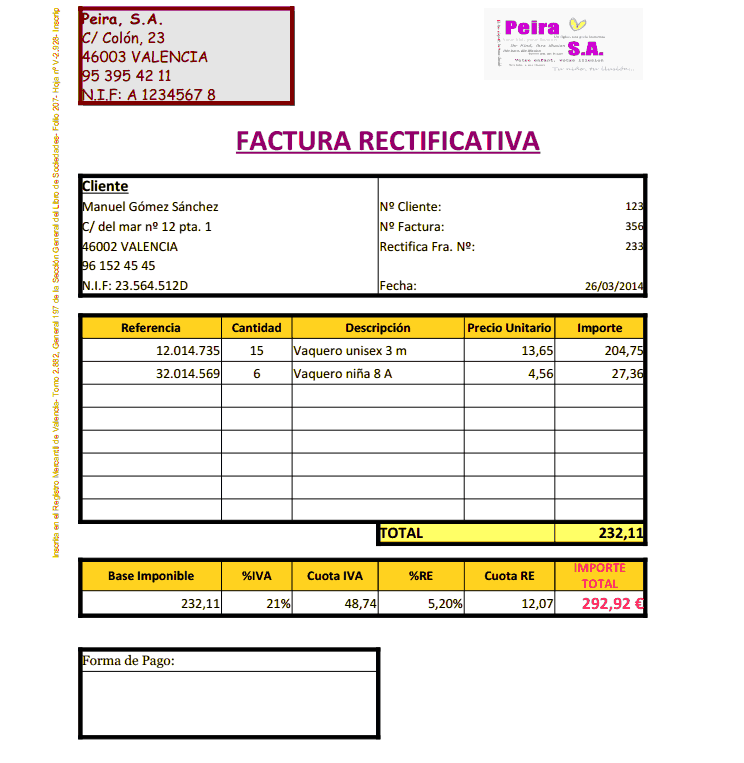
❌ Error
Register negative invoices without treating them as corrective or duplicating the accounting effect.
✅ How to avoid it
An invoice is correctiveif:
- It corrects a previous one
- It has negative amounts
- Indicates "corrective invoice", "credit note" or "cancellation"
In Odoo:
- Use the option Corrective invoice / Credit note
- Link it to the original invoice
Not reconciling payment methods (card, cash, bank)
❌ Error
Registering an invoice as pending when it is actually paid in cash or by card.
✅ How to avoid it
If you put:
- Cash→ it is paid at the moment
- Card / cash→ it should not remain to be collected
In Odoo:
- Register the payment correctly
- Use different journals: bank, cash, card
Misusing supplier and customer accounts
❌ Error
Not correctly creating the supplier record (NIF, address, country) or reusing different suppliers.
✅ How to avoid it
- Create one supplier per real company
Check:
- Correct NIF / CIF
- Country (key for VAT)
- Associated accounting account (400 / 410)
7
Not reviewing the taxable base and VAT
❌ Error
Registering only the total without checking if the base and VAT are correct.
✅ How to avoid it
Always check:
- Taxable base
- VAT rate
- VAT amount
Special attention to:
- Fuel tickets
- Simplified invoices
- Invoices with multiple lines (one with VAT and another without VAT)
8
Not periodically reviewing bank reconciliation
❌ Error
Importing bank transactions into Odoo but not regularly reviewing or completing the reconciliation. This causes discrepancies between the actual bank balance and the accounting balance, as well as making it difficult to control collections and payments.
✅ How to avoid it
Perform bank reconciliations periodically (weekly or monthly) to ensure that all bank transactions are correctly recorded in the accounting.
Best practices:
Import or synchronize bank statements regularly
Review transactions that Odoo has not automatically reconciled
Verify customer collections and supplier payments
Record bank fees or financial expenses as they arise
A frequently reviewed bank reconciliation allows for quick error detection, keeps the accounting up to date, and provides greater control over the company's liquidity.
Conclusion
Odoo is a very comprehensive tool, but accounting depends on how it is used. Most errors are not from the program, but from:
- Poor initial setup
- Lack of invoice review
- Basic accounting ignorance
With good setup, periodic review, and clear criteria, Odoo can become a key ally for accurate and stress-free accounting.
More than 50,000 companies use Odoo
to grow their business.
Join us to make your company a better place.