
The short Contaldia video is on YouTube: how to get Verifactu ready in Odoo — install the module, the company certificate and the status filter on customer invoices.
This is not a webinar. It is the setup, step by step, on a working database. About four minutes. Below: what Verifactu is, who must use it, who is exempt, and how it relates to the SII.
Spain Verifactu module
install and reload
or production:
one checkbox in Settings
the full video
certificate and filter included
What Verifactu is
Verifactu is the Spanish Tax Agency system for verifiable invoices. It comes from the Anti-Fraud Act: integrity of records, traceability and less fraud. Every invoice issued with software must be provable: it is not altered, it carries a hash, a QR code and is chained to the previous record.

Invoices made by hand in Word or loose spreadsheets stop being valid once a computer system is required. The programme must keep an ordered register, connect with the Tax Agency when needed and guarantee that data is not changed afterwards.

In Odoo the module has been available since July 2025 (Enterprise and Community via OCA). You can test it now. The legal duty is not yet in force: it was postponed to 2027.
Who must use it
Anyone who issues invoices in common territory with a computer billing system or a POS. Size and sector do not matter. Also anyone in VAT, modules or simplified invoices, if they use software.
- Companies and self-employed people who invoice with software.
- VAT taxable persons with a billing programme.
- Modules regime and simplified invoices, if the system is computerised.
Once you join Verifactu, you stay in that mode until the end of the calendar year. You can join mid-year; you cannot leave until 1 January.
The longer context is in Verifactu in Spain.
Who is not required
Not everyone is in. These stay out:
- 100 % manual invoicing. Every invoice by hand, with no programme or POS. The Tax Agency has a manual upload on its portal, with an invoice cap; it is not the path.
- SII. Anyone already on Immediate Supply of Information does not implement Verifactu. SII already covers the control the Tax Agency wants. It includes large companies, REGE (VAT groups) and REDEME (monthly VAT refund). If you are required to use SII, you cannot choose Verifactu. If you are not, do not join SII «to avoid» Verifactu: SII asks for sales and purchases; Verifactu, sales only.
- Basque Country and Navarre. Tax domicile in the Historical Territories or in Navarre: TicketBAI / Batuz, not Verifactu.
Exemptions and SII versus Verifactu: Verifactu not mandatory or joining SII. SII in Odoo: Odoo integration with SII.
Two modes and what is sent
There are two ways to comply:
- Verifactu with automatic sending. The invoice goes to the Tax Agency when you issue it. That is Odoo's mode.
- Compliant software without automatic sending. Chaining, custody, log and the ability to hand over records on request. It does not send the invoice at once.
Only issued invoices (sales) go out. Not purchases or expenses. Sending is immediate or almost, when you confirm and issue.
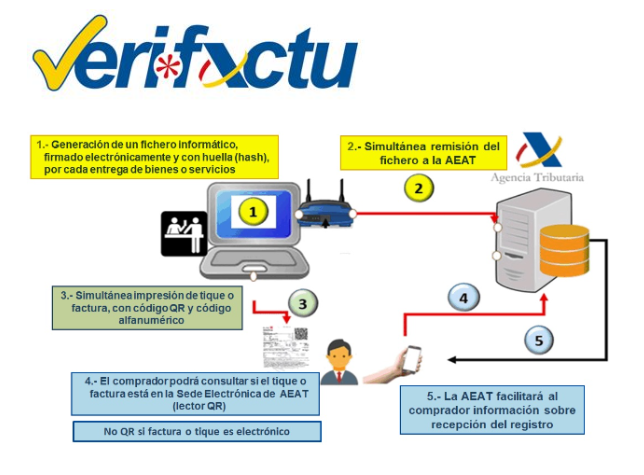
Verifactu flow: issue, send to the Tax Agency, QR on the invoice and buyer lookup.
For each invoice the Tax Agency receives, among other data: tax ID and name of issuer and recipient, number and date, whether it is full or simplified, description, base and total, system identifier, exact time of the record and the QR. Technical rules: Order HAC/1177/2024.
Odoo generates the hash, keeps the record unalterable and talks to the Tax Agency. The QR is on the PDF (in the body, not the header). Odoo has a responsible declaration for Verifactu. Who signs it: the partner if they host; the client if it is on-premise or Odoo.sh.
What the video covers
- Apps: search Verifactu (Spain Veri…) and install it. Reload the page.
- Settings → Accounting → Verifactu. The checkbox is already on. Leave the test environment for trials; uncheck it when invoices must go to production.
- Manage certificates → new. Company, certificate file, password and the Verifactu checkbox. Validity and serial number then appear.
- Accounting → Customer invoices. Verifactu status filter: sent or with error.
If you also upload e-invoices to town halls or other public bodies, you need another certificate, with the authority checkbox, not the Verifactu one. One for Verifactu and one for public administrations.
If you use POS, the l10n_es_pos module must not be installed: the Verifactu ones already cover the point of sale. Any uninstall, on a duplicate, not in production.
More from Contaldia
Verifactu stuck in your Odoo?
Write to info@contaldia.com or call 931 94 94 80. Courses and webinars at contaldia.com/events.