Prerequisites (required modules)
Before you begin, make sure you have the following modules installed and that you have updated the chart of accounts:
- Account chart update
- l10n_es_dua (up to version 16)
- l10n_es_dua_sii (only if you use SII).
You can also follow the example via video:
Video: How to account for an import (v16 and earlier) Video: How to accout for an import (v17 and later)
Key documents in an import
In an import operation you will typically find three main accounting documents:
Customs agent/freight forwarder invoice
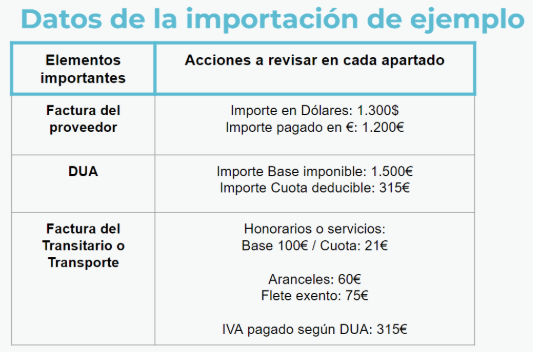
Invoice with fees, tariffs and VAT payment from the previous DUA.
➡️ In our case:
€100 fee including 21% VAT
€60 in tariffs
€75 freight or transportation exempt


Actual purchase invoice
Invoice in foreign currency, with its balance in euros corresponding to what we have actually paid to the supplier.
➡️ The amount paid totals €1,200.
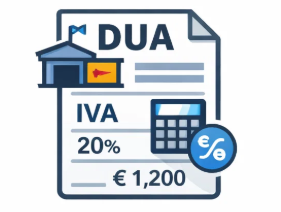
DUA
Document with the taxable base and VAT that the Tax Office has considered, usually different from the total of the previous purchase invoice.
➡️ The base of the DUA amounts to €1,500 and the VAT fee to €315.
How to record an import in Odoo?
There are several ways to account for the Single Administrative Document (SAD), but if you have accounting knowledge, this option is very useful for ensuring that payments are correctly reconciled by supplier. It is accounted for as follows:
Step 1) Important to record the DUA
The most important thing is to declare, in the imports box of form 303, the total DUA that the Treasury communicates to Customs.
This can be consulted in the DUA / CAU Consultation from the end of 2025 AEAT:
https://sede.agenciatributaria.gob.es/Sede/tramitacion/DB01.shtml
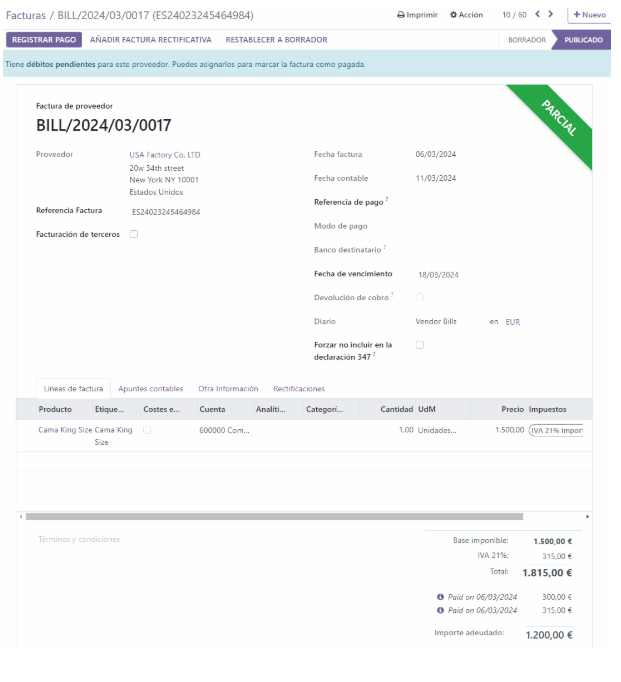
a) Create supplier invoice with tax position Importer with DUA
We create a supplier invoice and indicate, in the supplier or in the invoice itself, the tax position "IMPORTER WITH DUA".
b) Enter date and DUA number
We enter the date of the DUA and, as the invoice number, the corresponding DUA number (ESyearxxxxxxx).
The tax authorities verify that the length of the DUA is correct when sending it to the SII, therefore it is important to indicate it correctly.
c) Enter invoice lines according to the DUA
The invoice lines are used to enter the products purchased or imported from the corresponding purchase order. These must include the applicable tax.
VAT 21% on imports of goods or 21% EX DUA
The total base amount and VAT amount must match what is indicated in the DUA.
In case of discrepancies with what was imported from the purchase order, an adjustment line can be entered with the difference and the 21% import tax.
In our example:
- Base: €1,500
- Tax: VAT 21% on the import of goods
- VAT fee: €315
This invoice will be sent to the SII.
NOTE: If we create this invoice as a supplier with the tax position "Importer with DUA" in the name of the freight forwarder, we will "save" the final step of transferring the €315 of VAT paid to the freight forwarder.
NOTE: The "Importer with DUA" tax position activates that, when sending this invoice to the SII, the name and CIF of the supplier that communicates is that of the Odoo company itself, since it is the company itself that "pays" the DUA charged by Customs.
2) Register the freight forwarder/transport invoice
We will account separately for tariffs (which are not reported to the SII) with respect to other items subject to VAT, such as fees or freight.
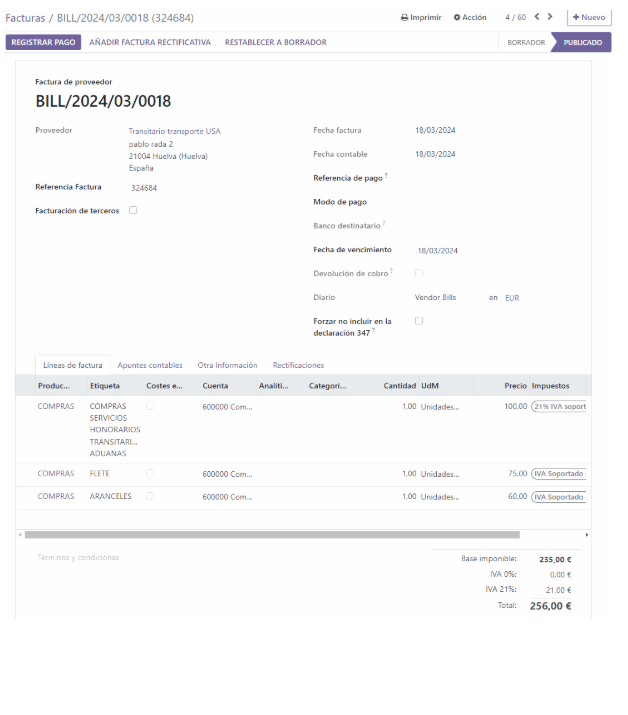
a) Freight forwarder invoice with expenses subject to VAT or exempt
We created a supplier invoice in the name of the freight forwarder, including only the items with VAT or exempt items.
We will ignore the item corresponding to the VAT fee paid by the freight forwarder on our behalf, since that amount has been accounted for in the DUA.
📌In our example:
- Line 1: Base €100, 21% current services tax, VAT fee €21
- Line 2: Base €75, corresponding to freight/transport with VAT exempt
This invoice will be sent to the SII.
b) Second invoice from the freight forwarder with tariffs (not subject to tariffs)
We created a second invoice in the name of the freight forwarder with the tariffs and other items that are not reported to the SII because they are not subject to VAT.
We will select the "DUA EXENTO" tax so that it is not sent to the SII.
In our example:
- Line: Base €60, corresponding to tariffs
- Tax: DUA EXEMPT
This invoice will not be sent to the SII (NOTE: You can create a purchase journal that will not trigger the SII.)
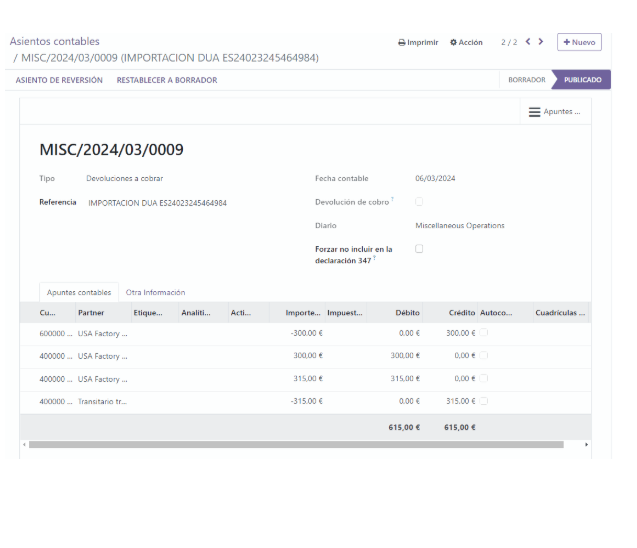
3) Regularization entry (based on DUA and payments)
In this manual entry we will adjust the amounts and reconciliations derived from the previous invoices.
a) Difference between DUA basis and actual payment to the supplier
Customs may estimate a different base amount than the amount actually paid to the supplier, due to valuations or exchange rates. This results in the customs declaration (DUA) not matching the actual amount paid.
To adjust this discrepancy, we made a manual entry in:
📌 Accounting → Accounting entries
a1) If the DUA declares more base than that paid to the supplier
In other words, Customs considers the products to be worth more.
In that case, the entry is made by subtracting the expense in account 600 for merchandise purchases:
xx€ (4000 import supplier) A (600x) xx€
a2) If the DUA declares less base than that paid to the supplier
Customs considers the products to be worth less.
In this case, the entry is made by adding the expense to account 600:
xx€ (600x) To (4000 import supplier) xx€
In our example:
- Actual supplier invoice base: €1,200
- Base declared in DUA: €1,500
- Difference: €1,500 − €1,200 = €300
We have recorded an extra €300 in account 600x, allocating more expenses to ourselves.
Therefore, the seat would be:
✅ €300 (4000 import supplier) A (600x) €300
With this adjustment, we can return to the DUA invoice and reconcile that amount so that only the amount actually paid to the supplier remains outstanding.
b) Adjustment of the VAT payment of the DUA: transfer to the freight forwarder
In step 1 we have recorded the VAT fee against the import supplier, when in reality we have paid it to the freight forwarder, who is in charge of processing the DUA.
Therefore, in this entry we will transfer the balance from the import supplier's account (4000) to the freight forwarder's account (400x or 410x).
📌 In our example, the VAT amount for the DUA is €315, therefore:
✅ €315 (4000 import supplier) A (400x or 410x freight forwarder) €315
Final result and reconciliations
With this adjustment:
- The invoice from step 1 (DUA) is reconciled with the adjustment entry for the tax bases and with the transfer of the VAT amount to the freight forwarder, or the VAT payment is already recorded against the freight forwarder and you reconcile the payment with the freight forwarder.
- It is now ready to be reconciled with the payment made to the import supplier.
Furthermore, when we reconcile the customs agent's (freight forwarder's) invoice with their payment in the bank statement, we will be able to reconcile the payment with:
- Freight forwarder's fee invoice
- Tariff invoice
- VAT transfer entry
Leaving both the invoice from step 1 (importer's DUA) and the invoices from step 2 (freight forwarder) fully paid.
Do you have any questions?
Contact us or watch our explanatory video on how to correctly account for an import in Odoo Spain, whether or not we are in the SII system.
Contact'us for more information