
¿Sabías que si te inscribes en REDEME o cumples ciertos requisitos no necesitas adaptarte a VeriFactu?
¡Solicita tu inscripción antes del 30 de noviembre!
Durante el mes de noviembre de 2025 está abierto el plazo para solicitar la inscripción en el REDEME (Registro de Devolución Mensual del IVA), con efectos desde el 1 de enero de 2026.
Como primera asesoría especializada en Odoo en España, desde Contaldia te explicamos qué pasos dar, cómo afecta a tu empresa y cómo evitar la adaptación al sistema VeriFactu.
🔍 ¿Qué es el REDEME?
El REDEME es un registro censal voluntario gestionado por la Agencia Tributaria (AEAT) que permite a los sujetos pasivos del IVA solicitar la devolución mensual del IVA soportado, en lugar de esperar al cierre del ejercicio.
Esta modalidad resulta muy útil especialmente para empresas que tienen saldos a su favor recurrentemente o que llevan a cabo inversiones importantes.
🏢 ¿Quién puede solicitarlo?
Se pueden inscribir:
- Empresas que ya están desarrollando actividad económica.
- Empresas que aún no han iniciado actividad, pero han realizado inversiones preparatorias, siempre que existan elementos objetivos que lo acrediten.
- El plazo ordinario es del 1 al 30 de noviembre de 2025. También existe un plazo extraordinario para quienes no lo soliciten en tiempo o aún no hayan comenzado actividad.
🚀 Ventajas del REDEME
- Devolución mensual del IVA soportado.
- Mejora de la liquidez empresarial.
- Obligatorio para empresas en régimen especial de grupos (REGE).
- No necesitas aplicar VERIFACTU, "de momento".
- Si emites facturas de terceros, puede ser mejor el SII inicialmente hasta que Verifactu este más maduro.
📌 Obligaciones y requisitos
Para acogerse al REDEME hay que cumplir con:
- Permanencia mínima de un año, o dos años si se solicita fuera de plazo o sin actividad.
- Presentación mensual de las declaraciones correspondientes.
- Llevar los libros registro del IVA mediante el SII (Suministro Inmediato de Información).
- Estar al corriente de obligaciones tributarias.
- No tributar en régimen simplificado.
🧾 ¿Y qué pasa con VeriFactu?
El sistema VeriFactu es un nuevo régimen de facturación verificable que exige, en principio, incorporar un código QR en las facturas, garantizar trazabilidad y autenticidad, etc. (según lo explicado en nuestro blog) (“Sistema VeriFactu en España: Qué es y cómo prepararte con Odoo”). Más información en Contaldia.com

¿Aún tienes dudas con VERIFACTU y Odoo?
Únase a Contaldia y descubra cómo Odoo, la fiscalidad y la contabilidad pueden llevar su empresa al siguiente nivel.
✔ Principales causas por las que NO estarías obligado a VeriFactu
- Estar inscrito en REDEME (ya implica SII).
Usar el SII, obligatorio para:
- Grandes empresas
- REGE (grupos de IVA)
- Empresas en REDEME
- Facturación manual (no informatizada).
- Empresas con domicilio fiscal en País Vasco y Navarra, donde aplica TicketBAI / Batuz en lugar de VeriFactu.
Las grandes historias son para todos incluso si se escribieron para una sola persona. Si trata de escribirla pensando en un público amplio y general, su historia sonará falsa y no será emocionante. A nadie le interesará. Escriba para una persona. Si es genuina para una persona, lo será para las demás.
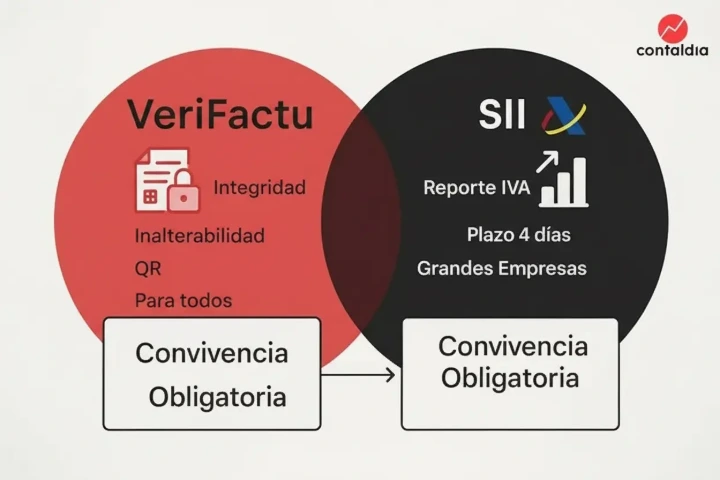
VERIFACTU vs SII
Diferencias entre SII y VeriFactu
Aunque ambos sistemas se relacionan con la información de facturación, su naturaleza y objetivos son distintos:
1. Objetivo
SII
- Su finalidad es informativa.
- Se envían a la AEAT los Libros Registro del IVA en un plazo de 4 días.
- Afecta principalmente a grandes empresas, REGE y REDEME.
VeriFactu
- Su objetivo es garantizar la integridad e inalterabilidad de las facturas.
- Controla el software de facturación y su trazabilidad.
- Está previsto para cualquier empresa o autónomo, salvo exentos.
2. Funcionamiento
SII
- Envío telemático de los registros de IVA.
- No afecta a cómo se generan las facturas, solo al reporte.
VeriFactu
Actúa dentro del software de facturación, controlando:
- Cadena de bloques (hash)
- Sellado de tiempo
- Registro inviolable
- Código QR
- Puede enviar los datos a AEAT automáticamente si se activa el modo VeriFactu.
3. Ámbito de aplicación
SII
- Obligatorio solo para ciertos colectivos.
- A corto plazo no se ampliará a todas las empresas.
VeriFactu
- Diseñado para aplicarse de forma generalizada a la mayoría de empresas y autónomos, salvo exenciones como SII o TicketBAI.
4. Compatibilidad
Ambos sistemas pueden coexistir, pero:
- Si estás en SII, no debes adaptar tu software al estándar VeriFactu.
- Si no estás en SII, sí tendrás que adaptarte, salvo excepciones.
Conclusión para empresas Odoo
Para muchos negocios, especialmente aquellos con volumen relevante o fuerte inversión, la inscripción en REDEME (y por tanto el uso del SII) puede suponer:
- Liquidez mensual
- Simplificación registral
- Evitar la obligación de VeriFactu
En Contaldia te ayudamos a evaluar si te conviene solicitarlo y lo tramitamos completamente por ti.
Hablemos...
Póngase en contacto con sus clientes para ofrecerles un mejor servicio. Puede modificar los campos del formulario para recopilar información más precisa.